Tuesday, May 23, 2017

EOY Animation Review

This year in animation we learned many new skills. We used programs like After Effects, Maya, and Photoshop. We learned how to create two and three dimensional objects, how to use the green screen, how to use special effects, and much more. Other than using computers, we learned many skills while working together. We learned about the technology,  how to collaborate with others, how to communicate, how to manage projects, and how to be a leader.

Throughout the year, we used three different programs: After Effects, Maya, and Photoshop. We started off with Photoshop and After Effects. One of our first projects was making a simple worm in Photoshop and using the puppet pin tool in After Effects to make it look like it was moving. This project took us a couple of days, but now it would only take us 15 minutes. Next we moved onto Maya. We started off by making a castle out of a couple polygons. like the worm project, this took us a couple of days, but would take us a few minutes today. As the year went on, I could definitely see my improvement. 

Although many of our projects were independent, collaboration was needed. If you needed help with something, many classmates were glad to help. If somebody else needed help I would help them, as well. I think collaboration was mostly needed during our final. We were put into groups of five or six and were supposed to make a video with the use of sound effects, green screen, and a moving 3-D object. Everybody worked on their own projects and added them into the server to then go on to put it into After Effects. We bounced ideas off each other and helped each other along the way to get the best grade possible and make the best project possible.

Collaboration was a large part of working together, but it could not be done without communication. During the final project we communicated at the beginning of the project to create our idea, and communicated in the end to assign different tasks to each other. I didn't only communicate with classmates, I also communicated with Mr. Netterville. Whenever I needed to know if I was doing something wrong, I asked Mr. Netterville. Whenever I needed help and couldn't get it from classmates, I communicated with Mr. Netterville. I think communication is very important to this program and can really be the difference between good projects and great projects.

During the year, we were assigned many projects and needed to be on top of them. If you didn't turn in a project on time, points would be taken off, and being late means less time for the newer projects to come. If you do not use your time wisely or efficiently, you will be in a hole for the rest of the year. In the first semester, I did not use my time wisely, I turned in a couple projects late and our final for that semester was late by a couple weeks. This poor time management resulted me getting a B. I have corrected this problem and turned in all my projects on time and used time wisely, and now I have an A.

The last guarantee is Leadership. In order to be a good group member, you have to be a leader. In the final project, leadership was needed to carry out your tasks as well as other group members' tasks. Making sure to communicate and critique others work is a good form of leadership and really helps out the project in the end.

I have learned and improved all of these skills as the year went on. Although eComm is fun, Iam dropping it next year. I thought it over and I don't think I have the time or passion to continue on. I will use these skills in other things in life to improve myself in everything I do. last summer I wanted to change animation to graphic design, but i missed the dead line. I think this happened for the better. I have really enjoyed this class and I am glad I stayed in it. I would not change a thing over the year.

Youtube Link


Monday, May 22, 2017

How to key out green screens in After Effects

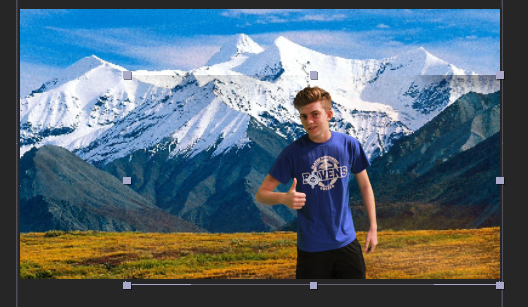
Keying with key light (1.2) in After Effects is very simple. It takes a few minutes and has a really good outcome. I will be using key light (1.2) to make a picture of me in some mountains.

1) Start off by taking a picture with the green screen in the back and finding a background picture.

2) Select the green screen picture then click effect, keying, key light (1.2).
3) click the dropper  
next to screen color and click the green screen. this should take out almost all of the green.


4) mess with the screen gain to lose the shadow around the original picture. 


5) Once you finish with the screen gain, you are finished.


Monday, April 17, 2017

Street Explosion Animation

In Animation, We used After Effects to create an explosion. We used a video of a city and we had layers of fire, explosions, glass breaking, etc. to create a realistic explosion. This was our first time using animations over video so we followed a tutorial closely.


Pre-Production
       We started off the project by loading in the background and the animations. We used one of the doors on the side to make the fire come out of. We also learned how to use layers over animations and how to use the pen tool.


Production
       We Put a fire explosion layer over the door and used a layer and the pen tool to make it look like the fire was coming from inside the building. We used the pen tool right after to make the animation go behind a light pole to make it look more realistic, as well. More layers were used when creating the scene, too. We used smoke charges coming from the fire afterwards, dust falling from above the building, debris shooting out of the door, and glass breaking next to the explosion. We color-corrected multiple layers to make it feel more real. I turned the smoke charge black and made the fire have a glow effect.


Post-Production
       We wrapped up the project by putting one more layer that glowed as the fire went off. This was the hardest step in my opinion. After that was done, we put in an explosion sound and rendered it out. Our first animation over a video was complete.


Review
       During this project we learned how to use the pen tool anyhow to color-correct layers. This project was fairly easy because we used a tutorial video and made ours almost identical, but that was to get us familiar with the software. If I could change one thing, I would add more explosions o make it longer and more entertaining. I would continue using layers and the pen tool, though, to make it more realistic. I think this project was a good starting point in our after effects unit and it was fun creating your own realistic explosion.

Thursday, March 30, 2017

The Plausible Impossible - Dwarves


In the cartoon, Dopey can get water out of his ears just from plugging his mouth and nose and blowing which sprays the water out of both his ears. This can't happen because your ears aren't connected to your lungs, but in the Dwarves, It seems like they are and Dopey easily gets the water out of his ears this way.


When Dopey lifts up one of the dwarfs to try and push Grumpy in the water, he drops him and the force of him falling pushes Dopey and Doc back a few feet and they even roll. In real life, if Dopey would've dropped him, he would have just fallen to the ground, but in the cartoon world, with squashes and stretches, since the dwarf squashes Dopey into the ground, he gets launched outwards and catches Doc with him.


After Dopey drops he Dwarf, he goes to grab soap. Because soap is slippery, when he jumps on it, it shoots out of his hands, hits Doc, and shoots back in his mouth and down his throat. This is impossible because soap can't be launched fast enough to hit off someone and come back and go down your throat. Not to mention, you can't swallow a whole bar of soap to begin with. This happens anyway because it shows Dopey messing up and it's not going to show Dopey choking when he could rather have hiccups with bubbles which isomer entertaining.


After Dopey swallows the soap, he starts hiccuping bubbles. This wouldn't happen because bubbles can't form just from soap and air from your lungs. This happens though because it goes along with Dopey's character always messing up and it is funny!

Towards the end, Dopey keeps hiccuping and he ends up getting launched in the air from his own hiccup then hiccups a bubble that carries his hat into the air. This isn't possible because hiccups don't launch you into the air, and bubbles can't carry hats into the air. Bubbles simply cannot carry that kind of weight. This happens though because the hiccups seem to be very powerful in the last couple of minutes, and it is funny!

Tuesday, March 21, 2017

Stand and Deliver Trailer Remake


To end off the third quarter, we picked a high school movie and made a shot by shot replica of the trailer to analyze the shots and how they were recorded. Our trailer was missing a couple of shots, but I think we executed it fairly well. My group chose the movie "Stand and Deliver." My group was made up of me, CJ Vredenburg, and August Berthed.

PRODUCTION

First, we made storyboards, a google doc of our cast, location for filming, outfits, and production schedule, then we recorded our scenes, and after that was finished, we started editing. Along the way, I learned that it's A LOT easier to do a project over time than rushing in the last couple of days. I also learned that making schedules really helps out and causes less stress on the group.

THINGS I WOULD CHANGE

If I could change something, I would've recorded earlier and followed the schedule more closely to meet the deadline and have more time to improve the final project. Although, I would've kept the same group members because I think we work well together.


 I thought this was a fun project, and really shows that recording shot for shot is not as easy as it sounds.

Tuesday, February 7, 2017

"Come and Get It" by Selena Gomez Re-make


"Come & Get It" by Selena Gomez Re-make


In our music video, Franchesca Manzella and Paige Winters were robbers and robbed a house. Our goal was to make a music video that was two minutes long, changed shots on the beat, and had a lot of shots and variety of shots. I think my video was more focused on the story than the flowing with the song, and thats what makes it different from the other videos in my group. Before we started recording and editing, we had to make a storyboard, a beat sheet, and a schedule for the whole project. After finishing those, we recorded and edited the clips to the music video. Along the way, I learned the different types of moving camera shots like pan, track, and zoom. I also learned that there has to be a lot of communication and teamwork to really succeed and make the video as good as possible. If I could change one thing it would be to color correct some shots so it didn't look all black in some shots. I would keep my editing type the same though; focusing more on the story and not so much on the song flow. After creating my first music video I experienced that it is much easier to edit music videos for me because my weakness is audio, and my strength is creating the story. Overall, I thought this was the most fun project of the year so far.

"Paradise" by Coldplay Music Video Review


"Paradise" by Coldplay

 
   In this music video, an elephant escapes a zoo and tries to find his friends by traveling around the world. The story being told is that friends and family are the most important things in life and it is worth doing anything to get to them. The one aspect I would apply to my work from this music video is the variety of settings. I think it really makes the video pop and makes it very colorful. After watching this video I saw that they changed shots to the beat and had a wide variety of them, whether it be a shot of the setting or a close-up of the elephant. This music video did a great job of keeping the viewers attention with all of the colors and beautiful contrast. One thing that could've improved was making the text on the cardboard signs darker so you can easily see what they say. I really like this music video and song. I believe it is a very uplifting video and has a great story and ending to wrap all of it up.